|
Troubleshooting
- There is not the genital texture on the Victoria 3 or
Stephanie 3 hip!
You must create the new Victoria or Stephanie geometry mesh object (remapped) for apply the
Magic Perfec G! textures
(See the tutorial "Remap Daz V3 & Daz Stephanie V3
Petite Geometries")
Windows users: is probable that you are using an
old version of UVMapper. Only the 2.5e version allows to save the UV
coordinates and the materials in a correct way, please download the last
UVMapper Version from Cox site
REMapper By Stephen L. Cox (Free program) downlodable here:
http://uvmapper.com/downloads.html
Windows user: Download REMapper (version is 1.0a)
Mac Users: Mac
users a happy news
UV Mapper for Mac doesn't save the materials during the UVMap conversion.
There is TWO way for install Magic Perfect G! on your Mac:
1-You must create the
geometries object file with any windows-PC, then you can transfer the geometries
object file on your Mac. The geometries create with a windows-PC they are
perfectly compatible with Mac.
UVS file conversion requires few minutes. After the geometries file creation,
all the other tutorial steps can be perform on your Mac.
http://uvmapper.com/classic.htm
2- Use
Maconverter by MartinC
http://www.geocities.com/SiliconValley/Sector/1306/1306/psrmconv.html
Normally Maconverter it doesn't recognize uvs file but... Try to
change the "uvs" extension by "obj" extension and
Maconverter will recognize the file and you will get your new V3 object file or
Your Stephanie 3 file.
A thanks to Mr. Salvador Bernadó that has suggested me this solution.
POSER  sometime the morph dials are not displayed sometime the morph dials are not displayed
here the solution:
1- Apply the INJ pose
2- Select the Body group of victoria 3 (second little arrow aloft to left)
3- select again the hip of victoria... whole MT they magically appear!
MPG Builder program doesn't work !
If for any reason the MPG Builder program
doesn't work (as Ex. Your Cr2 file of Victoria or Stephanie in named in
different way)
You can build manually the CR2 file using a text editor as Notepad or
NoteTabLight (downlodable free:
http://www.notetab.com)
Open Your Text Editor and load your Victoria or
Stephanie cr2 files.
(the cr2 path: "..Runtime/libraries/character/DAZ
People/")
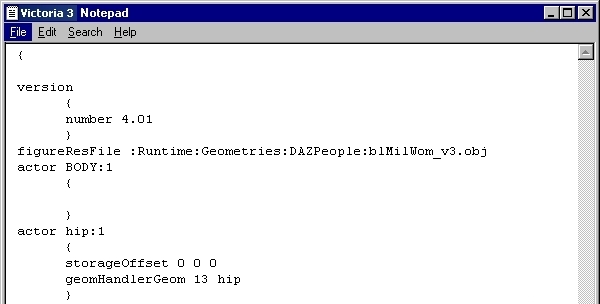
The cr2 file in your text editor is similar to
this image:
All tex editor have a function named: "Replace" in
the Menu "Search" (or "find&Replace"). This function searches a word or a phrase
and replaces it with a different word or phrase.
For Victoria, you need to replace the word "blMilWom_v3.obj" with
the new word "blMilWom_v3_PGnew.obj"
Select the menu "Search" and then the option "Replace"
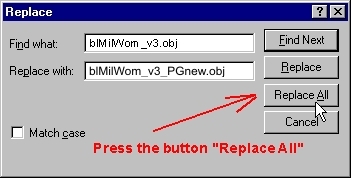 For Victoria For Victoria
For StephaniePetite, you need to replace the
word "blStephaniepetite.obj" with the new word "blStephanie_3_PGnew.obj"
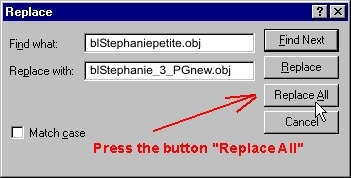 For Stephanie For Stephanie
Then save the file as a new name (as ex.
"VictoriaMPG.cr2" or "StephanieMPG.cr2")
IMPORTANT! Don't forget the extension ".cr2" Otherwise Poser won't
recognize the file
If you have not found the solution to your problem
contact me:
Index
|
 Troubleshooting help